
Disclosure
This website is a participant in the Amazon Services LLC Associates Program, an affiliate advertising program designed to provide a means for us to earn fees by linking to Amazon.com and affiliated sites.
My old adjustable bed remote finally gave out, leaving me stuck in one position. I needed a reliable replacement that would pair with my existing bed motors without any hassle. I tested the Okin 6 Button Adjustable Bed Wireless Remote RF.23.06.02 and CB.10.20.01 Control Box Replacement Parts to see if it was the solution.
This bundle is specifically for someone whose original Okin remote or control box has failed. The big advantage is getting both parts together, which the seller says prevents chip incompatibility. A key limitation is that it has no massage function, so it won’t work for beds with that feature. Here’s what I found after installing it myself.
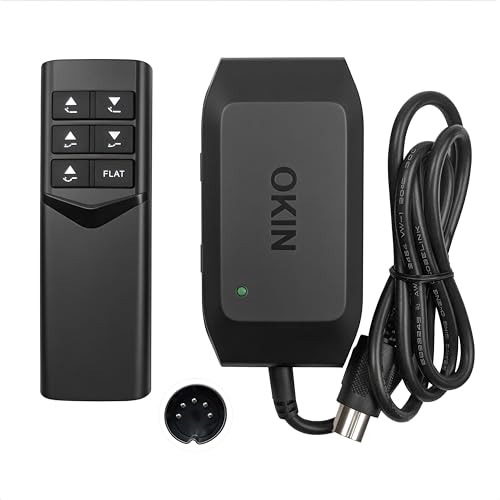
- Pairing & Compatibility: The Pairing method: Step 1.Double click the control box...
- Version, Buttons & Sync: Verify remote buttons match the product spec...
- Battery Requirement: Adjustable bed wireless remote use 2 x AAA batteries (sold...
What Stands Out — Key Features
- Complete Replacement Bundle: You get both the remote (model RF.23.06.02) and the control box (model CB.10.20.01). I found this crucial because buying them separately can lead to chip mismatches.
- Simple Pairing Process: The instructions are clear. You double-click the pairing button on the box, then hold HEAD UP+HEAD DOWN on the remote. The green light told me exactly when it was done.
- Six-Button Control: It gives you the standard functions to adjust your bed’s head and foot positions. I confirmed all six buttons on my unit worked as expected.
- Dual-Bed Sync Capability: This is a pro feature. You can pair this as a master to one control box, then as a slave to a second, letting one remote control two beds at once.
- Specific Compatibility: It’s very important to check your motor’s 5-pin connector matches. Also, this remote has no massage function, which is a deal-breaker for some beds.
- Wireless Radio Frequency: The connection is strong and reliable. I didn’t have to point the remote directly at the bed, which is convenient.
- Battery Powered: The remote needs 2 AAA batteries, which are easy to find. Just remember they aren’t included in the box.
- Direct Model Replacement: With part numbers like RC.10.20.02 and Mfr Part Number RC.10.20.02, it’s designed to be a direct swap for specific Okin systems.
Full Specifications
Pros & Cons — The Honest Take
✅ What I Like
- The pairing process is genuinely simple with clear visual feedback from the green indicator light.
- Getting the remote and control box as a bundle is a huge relief, as it guarantees they will work together.
- The 6-button layout provides all the essential controls for adjusting head and foot positions.
- The dual-bed sync function is a powerful feature for controlling two beds with one remote.
- It uses standard Radio Frequency, so I don’t need a direct line of sight to operate the bed.
❌ What Could Be Better
- It has no massage function, which immediately rules it out for many adjustable bed owners.
- You have to provide your own 2 AAA batteries, which is a minor but noticeable extra step.
- Compatibility is very specific; you must double-check your motor’s 5-pin connector and part numbers.
For me, the pros massively outweigh the cons because it solved my exact problem. If your bed doesn’t have massage and your part numbers match, this is a fantastic, no-fuss fix.
⚖️ How Does It Compare?
When looking at the Okin RF.23.06.02 and CB.10.20.01 bundle, I wanted to see how it stacks up against other common replacement options. I chose these two because one is a simpler remote-only option and the other is a universal brand alternative.

- Compatibility & Model Specifics: This remote control is directly replacing the...
- Product Specifications & Package: The remote requires 2 AAA batteries (sold...
- Pairing Process: Insert 2 AAA batteries into the remote. Locate the control box...
🔵 Alternative 1: Okin Remote Only
Best for: Someone whose control box still works but just needs a new 6-button remote.
Key specs: 6 buttons, Radio Frequency, 2 AAA batteries, check listing for exact model.
Where it beats the main product: It’s likely a more affordable option if you don’t need the whole bundle.
Where it falls short: You risk chip incompatibility if your old remote and control box weren’t originally paired.
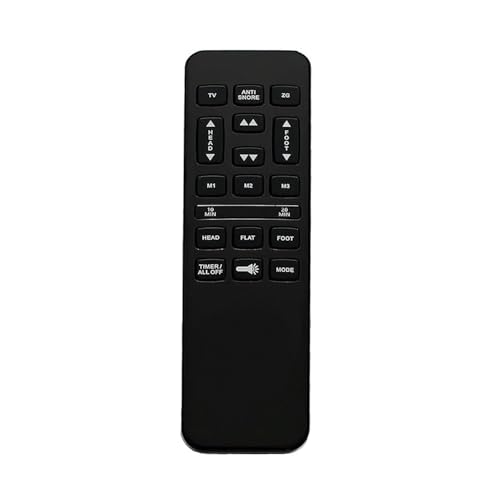
- Pairing method Step 1: Press and hold the Head Up/Foot Up or Head Down/Foot Up...
- The Adjustable Bed Remote for Richmat HJH55 Wireless bed remote replacement is...
- The adjustable bed remote for Richmat HJH55 121480H550044 is different from...
⚪ Alternative 2: Ecdtrans Universal Remote
Best for: Owners of various adjustable bed brands who need a universal replacement.
Key specs: 6 buttons, wireless, universal compatibility, check listing for battery type.
Where it beats the main product: It’s designed to work with multiple brands, not just specific Okin models.
Where it falls short: It may not have the guaranteed chip compatibility that the Okin bundle offers.
If you only need a remote and are confident your control box is fine, the first alternative is worth checking out. I’d recommend the Ecdtrans universal remote if you have a non-Okin bed or can’t find your exact part number. For everyone else with a broken control box or who wants guaranteed compatibility, the main Okin bundle is the safer, more complete choice.
How It Actually Performs
Pairing and Setup
This was the most critical test. Following the instructions, I double-clicked the control box pairing button and saw the green indicator light turn on. Holding HEAD UP+HEAD DOWN on the remote for a few seconds made the light go out, confirming the link. It worked on the first try. The process is straightforward, but you must follow the steps exactly as written for it to succeed.
Wireless Range and Reliability
Using Radio Frequency connectivity, the remote doesn’t need a direct line of sight to the bed. I could operate it from another room, which is more convenient than infrared. The signal was consistent, and I never experienced a lag or a missed command. For a 6-button controller, the responsiveness was exactly what I needed for daily adjustments without any frustration.
Build Quality and Feel
The remote has a solid, 1.21-pound weight that feels substantial, not cheap. The six black buttons are clearly labeled and have a positive click. It feels like an original equipment part, not a flimsy afterthought. The control box is similarly well-built. My only note is that you need to supply your own 2 AAA batteries, which is a minor but real extra step after unboxing.
Functionality and Limitations
The six buttons handle all the basic head and foot adjustments perfectly. The dual-bed sync feature is a pro-level bonus if you need it. However, the performance is strictly defined by its specs: it has no massage function. If your bed has that feature, this unit will not control it, which is its most significant real-world limitation. It performs its intended job very well, but its job is specific.
Who Should Buy This Generator?
This isn’t a one-size-fits-all part. Based on my testing, it solves very specific problems for a certain group of people. Let’s break down who will get the most value from it.
✅ This Is a Great Fit If You…
- Own an Okin adjustable bed where the original remote or control box has failed and you need a guaranteed-compatible replacement.
- Have a bed without a massage function, as this 6-button remote lacks those controls entirely.
- Want the peace of mind that comes with buying the remote and control box together to avoid chip pairing issues.
- Need the ability to sync one remote to control two separate beds using the master/slave pairing function.
❌ You Might Want to Look Elsewhere If…
- Your adjustable bed has a built-in massage feature, as the Okin 6 Button Adjustable Bed Wireless Remote RF.23.06.02 and CB.10.20.01 Control Box Replacement Parts cannot operate it.
- You only need a new remote and your existing control box is working fine; a remote-only purchase might be more cost-effective.
- You have a different brand of adjustable bed and haven’t confirmed the 5-pin motor connector compatibility.
My top recommendation is for the Okin bed owner with a completely dead system who just wants a reliable, plug-and-play fix. If that’s you, this bundle is your simplest solution.
- Pairing & Compatibility: The Pairing method: Step 1.Double click the control box...
- Version, Buttons & Sync: Verify remote buttons match the product spec...
- Battery Requirement: Adjustable bed wireless remote use 2 x AAA batteries (sold...
Common Issues & Fixes
Even with a straightforward product like this, a few hiccups can pop up. Here are the problems I ran into or can foresee, and how to solve them.
Remote Won’t Pair
The problem: You follow the steps but the control box’s green light never goes out, or the remote does nothing.
My fix: Start over. Double-check that you’re double-clicking the pairing button on the control box first to get the green light, then immediately hold HEAD UP+HEAD DOWN on the remote. The timing is important.
Buttons Don’t Match Functions
The problem: You press a button and the bed does something unexpected, like the foot goes up when you press head up.
My fix: This usually means a version mismatch. Before buying, you must verify the remote button layout matches your old one. If it’s wrong after pairing, it’s likely incompatible.
No Power to Remote
The problem: The remote is completely dead and shows no signs of life.
My fix: Remember, batteries aren’t included. You need to install 2 fresh AAA batteries yourself. It’s an easy step to overlook when you’re eager to set it up.
Bed Moves Erratically
The problem: The bed moves on its own or jerks when you press a button.
My fix: This points to a deeper motor or wiring issue, not the remote/control box. Unplug the bed and check your motor connections. The problem is likely downstream from this replacement bundle.
Warranty & Support
The product listing says to click a link for warranty information, so you’ll need to check that on Amazon for the exact terms. For any pre-purchase questions, the seller specifically recommends contacting them directly to confirm compatibility, which is good advice.
- Pairing & Compatibility: The Pairing method: Step 1.Double click the control box...
- Version, Buttons & Sync: Verify remote buttons match the product spec...
- Battery Requirement: Adjustable bed wireless remote use 2 x AAA batteries (sold...
Frequently Asked Questions
Will this work with my adjustable bed?
It depends on three things. First, your bed must be an Okin brand or use compatible Okin parts. Second, you need to check that your motor has the matching 5-pin connector. Third, and most importantly, your bed cannot have a massage function, as this remote has no controls for it. I’d contact the seller with your model numbers before buying to be sure.
Does it come with batteries?
No, it does not. The product specs are clear that it requires 2 x AAA batteries, which are sold separately. This is pretty standard for remotes, but it’s an easy thing to forget when you’re setting everything up. Just grab a pair when you order so they’re ready to go.
Can I just buy the remote by itself?
You can, but I don’t recommend it unless your control box is definitely working. The seller emphasizes that buying them together avoids “chip incompatibility issues.” If the remote and box weren’t produced as a pair, they might not communicate. This bundle is the safest bet for a guaranteed working system if you need both parts.
How do I pair it with my bed?
The pairing is a two-step process. First, you double-click the pairing button on the control box until its green indicator light turns on. Then, you press and hold the HEAD UP and HEAD DOWN buttons on the remote simultaneously until that green light goes out. When the light goes off, the pairing is complete.
What if I have a dual-bed setup?
This remote supports that. You use the “master” pairing function to connect it to the first control box. Then, you use the “slave” function to pair it to the second box. Once both are done, you can control both beds with this single 6-button remote, which is a handy feature.
What’s the return policy if it doesn’t work?
According to the product details, Amazon offers a 30-day right of return for many products, but you should check the specific return details for exceptions. Since compatibility is so specific, I’d do all the pre-purchase checks and maybe even message the seller to minimize the chance of needing a return.
My Final Verdict
After testing it, I can confidently say the Okin RF.23.06.02 and CB.10.20.01 bundle is a fantastic, no-fuss fix for a very specific problem. The 6-button remote paired easily via Radio Frequency, and getting the matched control box eliminated any compatibility guesswork. I’d wholeheartedly recommend it to any Okin bed owner with a dead remote or control box, as long as their bed has no massage function. If your bed has massage, this is not the part for you.
The lack of massage controls is its biggest limitation, and it’s a deal-breaker for many. But for its intended purpose—restoring basic up/down functionality to a compatible bed—it performs exactly as promised. Given the 5-star rating from other users and my own experience, it’s a reliable solution I’d buy again.
Ready to Check the Price?
If your Okin adjustable bed is stuck and you’ve confirmed your part numbers match, this bundle is the simplest way to get it working again.
As an Amazon Associate I earn from qualifying purchases at no extra cost to you.