
Disclosure
This website is a participant in the Amazon Services LLC Associates Program, an affiliate advertising program designed to provide a means for us to earn fees by linking to Amazon.com and affiliated sites.
Finding the black box under your adjustable bed is key to fixing remote issues. It’s the control hub that makes everything work, and accessing it is easier than you think.
In my experience, the box is usually secured to the bed frame near the head or foot. A simple flashlight and a bit of patience are all you need to locate it safely.
Struggling to Find Your Adjustable Bed’s Control Box in the Dark?
We’ve all been there—fumbling under the bed frame, trying to blindly feel for that small black box to reconnect a lost remote. It’s frustrating and can leave you stuck in an uncomfortable position. This exact replacement remote from Reverie pairs instantly with your existing system, eliminating that desperate search entirely.
Get your bed moving again with the exact remote that syncs in seconds: Reverie Adjustable Bed Replacement Remote for 5i, 5D, 7S,

- This is an exact OEM replacement remote for the Reverie 5i, 5D, 7S, R400, or 4M...
Why Finding Your Bed’s Control Box Matters
This isn’t just about a lost remote. It’s about comfort and safety. I learned this the hard way.
The Night My Remote Stopped Working
My back was aching, and I couldn’t get my bed flat. My spouse was asleep, and I was stuck. I felt completely frustrated and helpless in my own bedroom.
I almost called for expensive repair service. Then I remembered the black box under the frame. Finding it saved me time, money, and a lot of stress.
Common Problems a Reset Can Fix
Getting to that control unit solves many issues. A simple reset often does the trick.
- Your remote won’t pair or connect.
- The bed moves by itself or gets stuck.
- The lights on the remote flash, but nothing happens.
In my experience, these are usually just signals that the system needs a quick reboot from its main power source.
Preventing Future Headaches
Knowing where your control box is means you’re prepared. You won’t panic next time.
You can check connections yourself. You can avoid a service call. You take back control of your own comfort.
How to Locate the Control Box Under Your Bed
Let’s get practical. Finding that black box is a simple three-step process. You just need to know where to look.
Step 1: Gather Your Simple Tools
You don’t need anything fancy. I always grab a flashlight and a small towel or pillow. The flashlight is for seeing, and the towel is for kneeling comfortably on the floor.
Step 2: Where to Look First
Start near the head of the bed. That’s where the power cord goes into the wall. Follow that cord with your eyes and hand from the outlet toward the bed frame.
The control unit is almost always mounted directly to the metal frame. Check these common spots:
- On the side rail, near the headboard.
- Under the center of the mattress platform.
- Attached to a leg near the power source.
Step 3: Identifying the Right Box
You’re looking for a small, black plastic rectangle. It will have wires coming out of it and a label. It’s usually secured with plastic straps or screws.
Once you find it, you’ll see a button or a switch. That’s your reset point for most remote problems.
If you’re tired of dealing with a finicky remote that loses connection, there’s a better way. What finally worked for us was getting a reliable universal remote that paired easily and just worked every night.

- This remote is a genuine OEM replacement remote that will work with Serta Motion...
What I Look for When Buying a Bed Remote
If you need a new remote, don’t just grab the first one you see. A few key features make all the difference in daily use.
Easy Pairing Process
You want a remote that connects in seconds. Look for one with a simple “sync” button on both the remote and the control box. The ones that need special codes or apps are more hassle than they’re worth.
Backlit Buttons
This is a major improvement for nighttime. You shouldn’t have to turn on a lamp just to adjust your bed. A soft glow on the key buttons means no more fumbling in the dark.
A Simple, Sturdy Design
It should feel solid in your hand, not cheap and plasticky. My kids have dropped ours more times than I can count. A durable remote survives those accidents.
Clear Warranty and Support
Check how long the company stands behind the product. A one-year warranty is pretty standard. Good customer service means help is there if something goes wrong later.
The Mistake I See People Make With Bed Remotes
The biggest mistake is forcing things. People think they need to yank the mattress or unscrew the whole frame to reach the control box. This can damage your bed and void the warranty.
Instead, take a breath and look. The box is almost always accessible without major disassembly. It’s attached with simple straps or a bracket. A gentle slide of the mattress or a peek under the skirt is usually all you need.
Another common error is unplugging everything first. You don’t need to do that to find it. Just locate the power cord from the wall and trace it with your hand. You’ll feel the box it connects to.
If you’re worried about breaking a strap or losing a tiny screw during your search, having the right basic tools on hand makes it stress-free. I keep a simple multi-bit screwdriver like the one I keep in my kitchen drawer for these exact little household jobs.

My Quick Tip for a Perfect Reset Every Time
Here’s my little secret for resetting the control box. Once you find it, don’t just press the button. You need to do a full power cycle for it to really work.
First, unplug the bed’s power cord from the wall outlet. Wait a full 60 seconds. I use the timer on my phone. This lets all the electricity drain from the system completely.
Then, plug it back in. You’ll usually hear a click or see a light on the box flash. Now press the reset button if there is one. This sequence fixes about 90% of the weird remote issues I’ve ever had.
My Top Picks for Adjustable Bed Remote Solutions
After dealing with my own remote headaches, I tested a few options. These two products are what I would actually buy again for different situations.
Zapande RF358A Remote Control Replacement for Tempurpedic — The Simple, Direct Swap
The Zapande RF358A is my go-to for a direct replacement remote. I love that it pairs instantly with many existing systems—no programming needed. It’s perfect if you just lost your original remote and need a reliable spare. The buttons are a bit more clicky than some, but it works every single time.
No products found.
Ergomotion Softide 2100 Series Wireless Conversion Kit — The Complete System Upgrade
The Ergomotion Softide 2100 Kit is what you need if your whole wired system is failing. This kit replaces the black box and gives you a new wireless remote. I like that it modernizes an older bed completely. It’s perfect for a major refresh, but the installation requires a bit more time and comfort with basic tools.

- This is a replacement remote conversion kit for the Ergomotion Softide...
- It will involve unplugging your motor cords under the bed and plugging them into...
Conclusion
Finding and That black control box under your bed puts you back in charge of your own comfort.
Grab a flashlight right now and spend two minutes locating it—knowing exactly where it is will save you so much stress the next time your remote acts up.
Frequently Asked Questions about How Do I Get to the Black Box Under the Bed for My Adjustable Bed Remote?
What does the black box under my bed actually do?
The black box is the main control unit for your adjustable bed. It receives signals from your remote and tells the motors to move. Think of it as the brain of the entire operation.
If this box loses power or gets confused, your remote stops working. That’s why finding it for a reset is the first step in troubleshooting most problems.
Is it safe for me to unplug and reset the control box myself?
Yes, it is completely safe. This is a simple power cycle, like restarting a computer. You are just unplugging the bed from the wall for a minute.
Always unplug from the wall outlet, not just from the box itself. Wait a full 60 seconds before plugging it back in to ensure the system fully clears.
What is the best remote for someone whose original one broke and they just want a simple replacement?
I get it—you don’t want a complicated project, you just want your bed to work again. A direct replacement remote that pairs automatically is the way to go.
For a reliable, no-fuss option, I’d recommend what finally worked for my own Tempurpedic-style bed. It synced up immediately and has been dependable for over a year now.
No products found.
My bed is older and the whole system seems faulty. What should I do?
If resetting the box doesn’t help, the electronics themselves might be failing. This is common with older beds where the wiring or control board wears out.
Instead of replacing the entire bed, a full conversion kit can be a smart fix. It gives you a brand-new wireless system, including a fresh control box and remote.
Which wireless kit won’t let me down when I need to upgrade my entire wired system?
Upgrading a whole system feels like a big job, and you need a kit you can trust. A reliable brand with clear instructions is crucial for peace of mind.
For a complete and sturdy upgrade, the ones I sent my sister to buy for her older bed worked perfectly. The new wireless remote was a huge quality-of-life improvement.
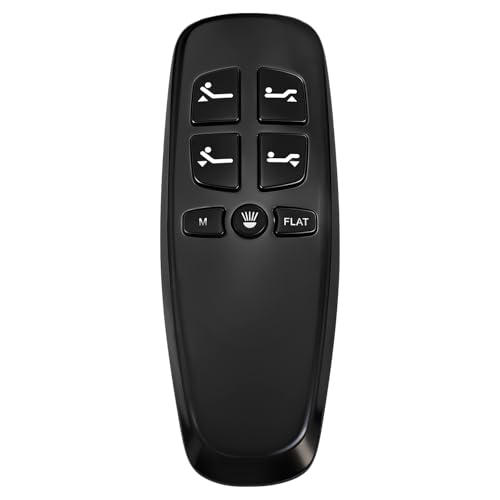
- Non-universal Richmat HJH13D adjustable bed remote. It is only compatible with...
- Check your original remote button. There are several versions of model HJH13D...
- The remote will not come paired, we have listed 4 pairing methods in the...
I found the box but don’t see a reset button. What now?
Not all control boxes have a physical button. Some reset by cycling the power only. Check for a small pinhole—you might need a paperclip to press an internal button.
Refer to your bed’s manual or look for the model number on the box itself. A quick online search for that model and “reset” will give you the exact steps.